Se afișează postările cu eticheta Photoshop. Afișați toate postările

vineri, 25 martie 2016

Google Nik Collection is Now Free

Google Nik Collection
The Nik Collection is a set of image enhancement tools and photographic filter plug-ins for Adobe Photoshop, Adobe Photoshop Elements, Adobe Lightroom and Apple's Aperture.
Photo enthusiasts all over the world use the Nik Collection to get the best out of their images every day.
The Nik Collection is comprised of seven desktop plug-ins that provide a powerful range of photo editing capabilities — from filter applications that improve color correction, to retouching and creative effects, to image sharpening that brings out all the hidden details, to the ability to make adjustments to the color and tonality of images.
Starting March 24, 2016, the latest Nik Collection will be freely available to download: Analog Efex Pro, Color Efex Pro, Silver Efex Pro, Viveza, HDR Efex Pro, Sharpener Pro and Dfine.
Download Google Nik Collection for free

vineri, 24 iulie 2015

Giveaway - iResizer 3

iResizer 3
Resizer helps to resize images without destructing or cutting the content. It will scale a photo without changing its main visual content: people, buildings, animals and other objects. Unlike other resizing programs, which affect all pixels while scaling a picture, Intelligent Resizer affects pixels in areas that do not have important visual content.
Intelligent Resizer also allows you to “fix” the aspect ratio of a photo. It folds the image so that it will still look natural and will retain the quality, integrity and spirit of the original. In order to preserve important objects you simply select them and run the resizing, the rest is done automatically. Moreover, Intelligent Resizer can change the spacing between main objects as well as remove objects from image like you’d fold a paper photo. Creating square images for Instagram without cropping is also possible with the app!

Download link available today: http://www.giveawayoftheday.com/iresizer-2/

Tutorials (help) page:  https://www.iresizer.com/tutorials.html

Free alternative: Liquid rescale plugin for Gimp 

Content Aware scale tutorial for Photoshop users:  https://youtu.be/HNhHs4Kk580
and for  Photoshop Elements users: http://tv.adobe.com/watch/photoshop-elements-9-how-tos/recompose-to-any-size-without-distortion/

luni, 6 aprilie 2015

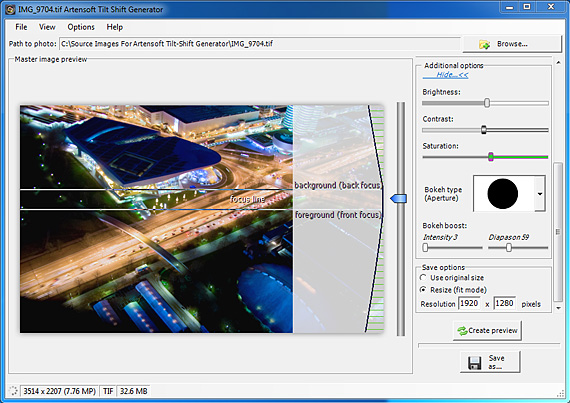
Giveaway - Tilt Shift Generator 1.2

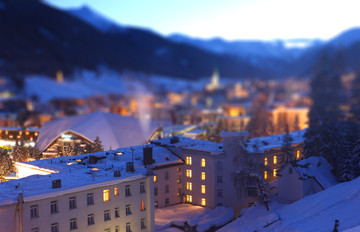
One of the best programs for creating photos with a tilt-shift miniature effect. You can find a lot of applications that claim to apply similar effect to images, still most often the algorithm is improper, e.g. they use Gaussian blur instead of much more complex Lens (optical) blur which produces an effect identical to real bokeh; or they apply semi-transparent overlay, using wrong type of transition from focused to blurred areas, etc.
Tilt Shift Generator renders the original image pixel-by-pixel with the highest accuracy. This utility offers additional settings which help the output images to be better in comparison to photos taken by high-priced “tilt and shift”  lens to simulate the miniature effect. Tilt Shift Generator surpasses Photoshop tools and popular cameras’ built in filters by result.

Download link available today:  http://www.giveawayoftheday.com/tilt-shift-generator-1-2-5/

Free alternatives:

What is bokeh (lens blur): http://en.wikipedia.org/wiki/Bokeh
Tilt-shift photography Wikipedia article: http://en.wikipedia.org/wiki/Tilt%E2%80%93shift_photography
Bokeh photography tutorials on DIYphotography: http://www.diyphotography.net/?s=bokeh

If you have Lightroom or Photoshop:
Lightroom 4 tilt-shift (bokeh) tutorial:

Photoshop tilt-shift (bokeh) tutorial: