Se afișează postările cu eticheta HDRI. Afișați toate postările

duminică, 22 ianuarie 2017

Giveaway: HDR projects 3 Pro

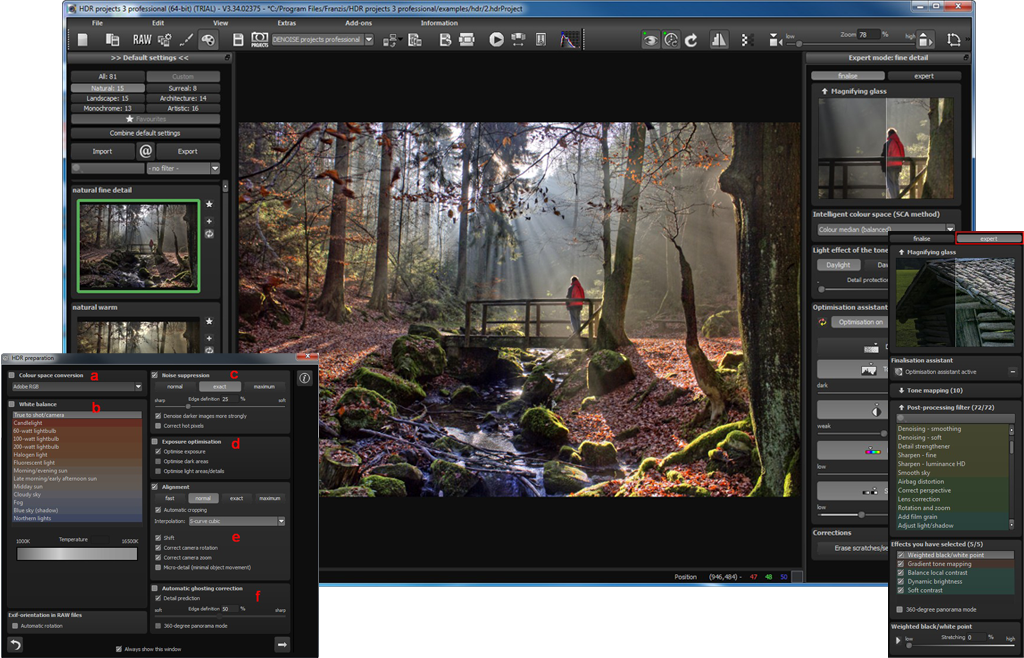
HDR projects 3 Pro
Originally launched in 2012, HDR projects has taken HDR photography to a whole new level. Smart Colorspace Adaptation (SCA), a unique and entirely new development of the projects line, determines an individual, intelligent colour space for every calculated step. This capability enables elementary enhancement of the primary colours’ vividness, with finer and more distinct colour gradation.
  • New: More professional pro-league RAW converter for all RAW formats;
  • New: Now 81 presets for faster professional results;
  • New: Now with 10 tone mapping calculation algorithms for the most creative freedom possible;
  • New: Now with 72 high-end filters for creative looks and print-ready images.

HDR and photo editing software: http://www.hdrlabs.com/tools/links.html
HDR tutorials: http://www.hdrlabs.com/tutorials/index.html

Free Photo Editing Alternatives:
luni, 23 mai 2016

Giveaway: HDR Projects 3 for Windows & Mac

HDR Projects 3 - photo editor
HDR Projects 3 offers photo enthusiasts the tools to create masterful images. The software generates real 32 bit images, containing all of the brightness information of the real world and not just a part of it, like systematic digital cameras. Aided by innovative algorithms, intelligent presets and high-end filters, you can create images that are beyond inspiring.
Features:
  • NEW! Complete RAW module for best image quality and maximum editing options;
  • NEW! Individual expansion with Add-on system;
  • NEW! Remove sensor spots, level horizons, add vignetting and correct distortions;
  • NEW! Smart Colorspace Adaption (SCA) for the finest detailed color gradation;
  • Informed Optimization Assistant.
Donwload link available today:  https://www.giveawayoftheday.com/hdr-projects-3/
If you are a Mac user please download an installation file here (66.9 MB).

Free Alternatives


vineri, 25 septembrie 2015

Giveaway - HDR Projects 2


HDR Projects 2
HDR projects 2 offers you new possibilities to influence the HDR process directly. You can choose between seven HDR algorithms and during HDR creation you can determine parameters such as smoothing, denoising, halo adjustment and many more. You can partially define single image areas by directly adjusting the weighting during HDR fusion. Even when working with single images you will achieve sensational results.
HDR projects 2 eliminates the typical peculiarities of HDR processing: Halos, ghost images, tonal value shifts, chromatic aberrations, color noise. If you know HDR, you know of these issues, but with HDR projects 2, even the finest structures remain visible and edges without halos stay razor sharp.
- HDR interpretation from a single image
- 7 different HDR algorithms
- Individual weighting for every luminance
- Selective luminance and HDR weighting with HDR Painter
- Integrated RAW processing for virtually every RAW format
- Very precise alignment, making your exposure bracketings razor sharp
- Fully automatic high-end ghosting correction with manual control for extreme situations
- 56 presets, sorted by theme, for quick and professional results
- 5 tone mapping algorithms for maximum freedom of image interpretation
- 52 high-end filters for creative finishing and ready to print images
- Interface for Adobe Lightroom and plugin for Adobe Photoshop/Photoshop Elements
HDR Projects 2
Faster - more powerful - more reliable! A new generation of software for images with unrivalled dynamic and expressive power.
- More than just compensating light exposure problems
- More than just editing images
- More than just developing pictures
- More than just living with the inadequate standards of camera technology
HDR projects 2 is intended for professional photographers as well as for ambitious hobby photographers.

Download link available today: http://www.giveawayoftheday.com/hdr-projects-2/
HDR and photo editing software: http://www.hdrlabs.com/tools/links.html
HDR tutorials: http://www.hdrlabs.com/tutorials/index.html

Free Photo Editing Alternatives:

miercuri, 4 februarie 2015

Download 3D fractal art software Substance for free

3D fractal art software Substance
Stephane Marty has made Substance (organic and 3D fractal software) and Emulsion (photorealistic rendering) available to download free.

Create organic 3D forms quickly and intuitively

Substance is an intuitive tool for generating 3D fractals and organic forms.
You can use a ‘fractal microscope’ to navigate 2D fractals and isolate sections and convert them into 3D forms.


The resulting geometry can be exported in OBJ format, using a built-in mesh-decimation algorithm; or rendered using Substance’s P.U.R.E. unbiased rendering engine. There’s even support for augmented reality.
3D fractal art software Substance

The second application, Emulsion, is a progressive real-time physically based renderer. It works in CPU-based, GPU-based and hybrid modes, and supports multi-core and Hyper-Threaded systems.
The software includes a basic materials editor and camera settings, and supports tone mapping.
It imports 3DS, OBJ, DAE, DXF, PLY, STL and RAW files and exports HDR and EXR files – and again, has a built-in augmented reality option.


System requirements and availability
Both Substance and Emulsion are compatible with Windows XP and above, although for Emulsion, you’ll need to be running a 64-bit OS. Emulsion’s GPU rendering mode supports both Nvidia and AMD cards.
Both applications are free downloads and are provided without support or documentation: note that the inline help no longer works, since NeuroSystems’ servers have now been shut down.
Download Substance from Stephane Marty’s website
Download Emulsion from Stephane Marty’s website

miercuri, 28 ianuarie 2015

Giveaway - Zoner Photo Studio 16 PRO

Zoner Photo Studio
Zoner Photo Studio is the only photo software you’ll ever need. User-friendly Windows software, whose №1 advantage is that it brings every feature you need in a single package. From importing photos onto your PC, to organizing a photo archive, to editing, sharing, and RAW. And almost everything Zoner can do, it can do for batches of photos as well. For example, you can give 1000 vacation photos a frame, resize them to the size you need for a photo album, etc., all at once, saving you time.

Without doubt, it is a serious alternative to Adobe Lightroom. Zoner Photo Studio has a similar interface with a logical workflow.

Key Features:

  • Importing: Right as you’re downloading your pictures to your PC, you can tag them, rotate them to match camera rotation (EXIF), back them up, and more.
  • Managing: Give photographs a rating from 1-5, colored labels, descriptions, and more. Drag-and-drop them onto an integrated Google Map to GPS-tag them, so you’ll know exactly where your photos were taken even years from now. Then find any photo you need in seconds, even among thousands of others.
  • Editing: Dozens of photo editing and retouching features – cropping, resizing, straightening, local edits, exposure and color fixes and more. A Quick Edits panel helps you fix a picture in moments using just a few sliders. The Editor also offers dozens of creative Quick Filters and other creative tools like HDR, Tone Mapping, 3D, panoramas, etc.
Download link available today: http://www.giveawayoftheday.com/zoner-photo-studio-16-pro/

About.com review ****: http://graphicssoft.about.com/od/productreviews/ss/Zoner-Photo-Studio.htm 
Download.com review****: http://download.cnet.com/Zoner-Photo-Studio/3000-2192_4-75186165.html

Zoner free Android photo app: http://www.zoner.com/en/zoner-photo-studio-for-android 
Google play - Zoner Android photo app: https://play.google.com/store/apps/details?id=com.zoner.android.photostudio

Free Alternatives: