Se afișează postările cu eticheta digital painting. Afișați toate postările

marți, 27 decembrie 2016

Giveaway: Particle 9 - digital painting from Project Dogwaffle

Particle 9 - digital painting from Project Dogwaffle
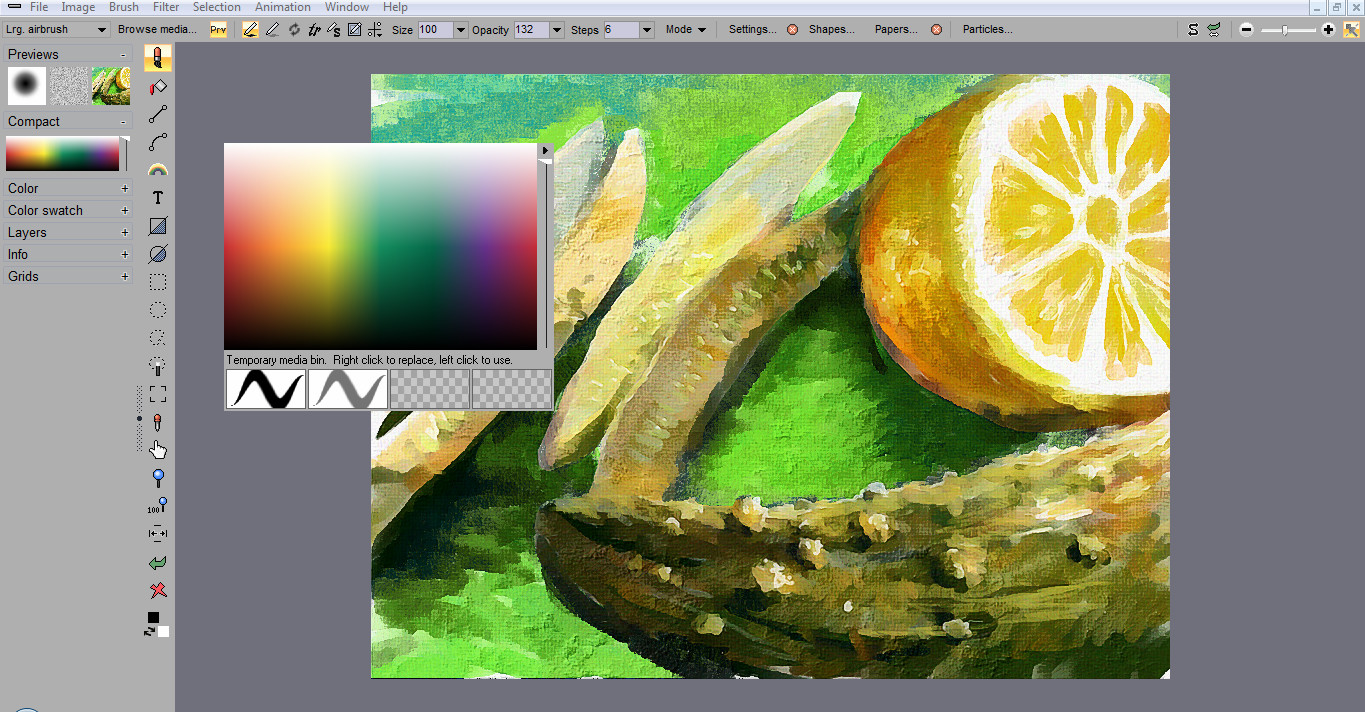
Particle 9 is an art program with unique foliage painting tools, along with more traditional natural media. It is a small and light app, and a feature-rich desktop program. It features drawing with art tools like airbrush, bristle brushes, and watercolor, particle based foliage and natural phenomenon, and creation of shapes like curves, boxes and ellipses, that can be filled in a variety of ways. The interface is simple and easy to learn, and all the features are easy to access.
Particle 9 is based on Howler, a media suite all-in-one paint program, with many additional features, such as painting on animations with other animations, creating and animating 3D landscapes, working with visual effects, and much more.

Download link available today for Particle 9: http://squirreldome.com/Particle_9.htm


Free alternatives:
 

vineri, 1 aprilie 2016

Giveaway: Particle 9 and PD Howler 8.2 Home Edition

Particle 9
Particle 9 is an art program with unique foliage painting tools, along with more traditional natural media. It is a small and light app, and a feature-rich desktop program. It features drawing with art tools like airbrush, bristle brushes, and watercolor, particle based foliage and natural phenomenon, and creation of shapes like curves, boxes and ellipses, that can be filled in a variety of ways. The interface is simple and easy to learn, and all the features are easy to access.
Particle 9 is based on Howler, a media suite all-in-one paint program, with many additional features, such as painting on animations with other animations, creating and animating 3D landscapes, working with visual effects, and much more.


Download link available today for Particle 9:   https://www.giveawayoftheday.com/particle-9/

Project Dogwaffle Howler

A paint program like no other. Project Dogwaffle Howler lets you paint with a large number of natural media styles as well as unique medias like particle foliage, animated brushes and more. Tablet devices are fully supported.
There are advanced painting modes such as symmetry painting. There are a large number of filters that operate in real-time and full-screen. Also provided are video and animation tools such as a timeline, keyframer, batch scanning, cleanup, exposure sheet, rotoscoping, and motion tracking.


Download link for Project Dogwaffle Howler:
http://thebest3d.com/howler/download/home-edition/index.html

Penny Paint

Penny is a Spline based drawing and painting engine, developed by Dan Ritchie, and which was first introduced with Project Dogwaffle version 2.1

Penny Paint is an alternate paint engine expanding Project Dogwaffle's capabilities with Spline smoothing of mouse strokes. It is included for free with most versions of Project Dogwaffle, including PD Artist and PD Howler, and also as a free add-on by download for PD Particles. If you still use the older versions such as PD Pro 3, 4, 5 or similar, there is Penny Paint for that too.

Great for cartoonists who have a fast hand with the mouse or their graphic tablet and who  still want their line art to remain perfectly smooth, i.e. without jagged corners, this paint engine uses Spline interpolation between the sampled mouse/tablet points, so it looks perfectly smooth without line segmentation no matter how fast you draw your lines. It's perfect for artists with a fast hand, or those used to perfectly smooth lines seen in some vector drawing products. Here you can get the same results - with raster based drawing tools. It looks like vector lines, without the hassles of,...well, vector lines.

Note that if you want true vector objects, at least temporarily, you can use the Linear tool in Howler. There you deal with control points through which you define the smooth Spline or Bezier curve. Not here in Penny. With Penny, you immediately draw into the raster image. But it looks perfectly smooth, antialiased and scrisp as could be. Plus, there are some very cool extra options such as transparency, feathering or paper texture controls.

Download link for Penny Paint: http://www.thebest3d.com/dogwaffle/penny/download.html

Free alternatives:

vineri, 4 decembrie 2015

New features in Krita - open source digital painting software

Krita
Krita Desktop is a free an open source painting application.
The next version of Krita will be 3.0. There is a lot of development going on fixing issues with shortcuts, issues with the opengl canvas, issues with icons… And making packages. Ubuntu Linux users can already use the Krita 3.0 Unstable packages in the Lime repository.

A small recap of the workflow improvements brought to Krita digital painting software this year.


Krita Animation and Instant Preview details: https://krita.org/item/krita-2-9-animation-edition-beta-released/

Free download link - version 2.9.9:  https://krita.org/download/krita-desktop/

marți, 12 mai 2015

New Krita Kickstarter campaign - open source digital painting

Krita - open source digital painting

"Krita: free paint app - let's make it faster than Photoshop!" - Kickstarter campaign.

The second Kickstarter campaign for Krita development is doing well (16.000€ and 21 days to go).

Primary goals:
  • Make Krita really fast on big canvases with big brushes
  • Make Krita an awesome 2D animation tool

Kickstarter campaign link and more details: https://www.kickstarter.com/projects/krita/krita-free-paint-app-lets-make-it-faster-than-phot

Krita - brush engine - digital painting
Krita is a free raster graphics editor, designed to be a digital painting application. It has been influenced to some extent by software like Corel Painter. Krita packs with some key features different than most of its kind, including the ability to work with both bitmap and vector illustration.

More details about the previous release (from the first Kickstarter campaign):
 http://open-source-spot.blogspot.ro/2015/02/krita-29-open-source-digital-painting.html

Download link for Krita (Windows, Linux, MacOS): https://krita.org/download/krita-desktop/


Meet the Krita team (2014): Steven, Stuart, Lukas, Wolthera, Timothee, Boud, Sven, Leinir and Dmitry.

luni, 9 martie 2015

FotoSketcher 3 - turns digital photos into art automatically

FotoSketcher - brushstroke effect
FotoSketcher 3.00 has been released.
FotoSketcher is a free program for Windows which converts your digital photos into art automatically and in just a few mouse clicks.

You can download the official version here: http://www.fotosketcher.com/download-fotosketcher/

New features in version 3.00:
  • New Painting 10 (brushstrokes) effect
  • New "invert colors" function (in the Edit menu or CTRL+I shortcut)
  • Integration of the "invert colors" function in the script mode (F5)
  • Improved Painting 4 responsiveness
  • Cosmetic changes to the user interface (especially when the program is maximized)
  • New keyboard shortcuts (left, right and up keys) to move the divider between the left and right panes. Works when the main window is focused, even if an effect is running.
FotoSketcher effects examples:


FotoSketcher video tutorial:

joi, 26 februarie 2015

Krita 2.9 - open source Digital Painting

Krita 2.9 - open source Digital Painting
Open-source paint tool Krita 2.9 introduces new workflows for HDR painting.
The development team calls version 2.9 Krita’s “biggest release until now” with dozens of new key features.
Although Krita has been around for a while, it has rapidly grown better suited for serious professional work over the past two years – development further accelerated by last year’s successful Kickstarter campaign.

Highlights of this release:
  • new Perspective transform tool with vanishing points highlight;
  • new Cage and Liquify transform tools;
  • non-destructive transformation via transform masks;
  • various improvements in deep painting;
  • better blending in the Mix brush and assorted improvements in brush engines;
  • new assistants to help drawing parallel and infinite lines, as well as objects in perspective;
  • updated port of G'MIC to provide all the new features including artwork colorization;
  • better support for PSD and EXR files, newly added loading of raw files, newly added support for r16 and r8 heightmaps.
New transform modes, HDR colour picking
Features funded by the Kickstarter cash include a range of new transformation modes, including Liquify, Perspective and Warp, all with support for masks for a non-destructive transform workflow.
In addition, the colour picker now supports HDR colour selection, in the shape of the HSI and HSY colour spaces. (The I and Y components effectively turn exposure up or down.)


There are also a number of changes to brushes, including anti-aliased brush tips, better blending in the Mix brush, and the options to save changes to brush presets on a per-session basis.
Krita 2.8 interface
More Photoshop-like workflows for masking images and browsing reference material
Masking now works in a way more similar to Photoshop, with a new global selection mask, and the option to separate alpha channels into transparency masks.
And like Photoshop, reference images can now be viewed alongside your painting in multiple sub-windows, which are cascaded or tiled automatically. Alternatively, there is a full-screen tabbed window mode.
Lots more new features and pipeline integration improvements
Other highlights include a new option to split all of the flat colours on a layer into their own separate layers; and new assistants for parallel, infinite and vanishing point lines in perspective drawings.
Compatibility with professional pipelines advances steadily, with all but four blending modes in PSD files now supported, improved OpenEXR support, and the option to import RAW files.
There are also a lot of smaller additions and bugfixes, which you can find in the official release announcement.


Availability
Krita 2.9 is available now for most popular flavours of Linux or Windows Vista and above. There is a experimental and unstabl” Mac build  (OS X 10.9).
Read a full list of new features in Krita 2.9
Download Krita 2.9

marți, 10 februarie 2015

The story of Paris-8 University going for Krita, Blender, Natron - Open Source CG software

Krita - digital painting
In the last years Blender and now Krita had evolved on a steady pace which proved to be an attractor for newcomers in CG industry.
Alexandre Prokoudine has posted an interesting article about the switch to open source software at Paris 8 University:
http://libregraphicsworld.org/blog/entry/the-complete-story-of-paris-8-university-going-for-krita-blender-natron
Blender - 3D shader editing
Let's hope it will be a serious push in development and will enhance the communication between coders and artists.
It's important to have an efficient workflow and the right tools with fast results.
Natron - compositing

An experimental short film named "The Desert of Sonora" ("Le Désert Du Sonora"). 


marți, 16 decembrie 2014

Krita stable beta 2.9 - digital painting

Krita
Krita version 2.9, currently in public beta, brings a long list of improvements to the paint package’s UI and overall workflow, along with a revamped transform tool and a new colour selector.
The Krita team has released the first public beta of Krita 2.9, the latest release of the open-source paint package, adding a new Liquify tool, a new colour selector, and a lot of workflow improvements.
Krita has been steadily adapting itself to a professional user base in recent releases, adding support for OpenColorIO and the option to export layered PSD files in version 2.6, and full Windows support in version 2.8.

New Transform tool, better brush tools, better colour handling
The most significant single feature is probably the revamped Transform tool, which now supports Perspective, Cage and Liquify transformations. There is also a new non-destructive transformation mask type.
Changes to the brush tools include better anti-aliasing and the long-awaited separation of Flow and Opacity. Colour handling has also been overhauled, with a new colour selector with sliders for every colour model.
UI improvements and file format support
There are also a lot of changes affecting overall workflow: the option to open more than one image in a window, or the same image in multiple windows, is one that many artists will find important.
The release also improves support for RAW and PSD files, with all but four PSD blending modes supported.
Photoshop layer styles and layer masks – a target of Krita’s successful recent Kickstarter campaign – are not suppported in version 2.9, but should follow by the end of January.
Availability
Krita 2.9 Beta 1 is available now. Stable builds are available for Linux and Windows; Mac OS X users get an unofficial build missing some features, particularly in the brush engine.
Krita Sketch and Krita Gemini, which provide touch support on suitable devices, have been disabled in the beta version, but should be restated in the final release, which is due in January.

More details: https://krita.org/item/krita-2-9-first-beta-released/

joi, 6 martie 2014

Krita 2.8 released - digital painting software

Krita 2.8
Krita, the ultimate weapon in the armoury of a Linux-based digital painter's, just got updated. New tools make it more interesting for creating game art, and full Windows support is a bit of a game changer.

What's new


For Krita, the last six months of work equal to an astonishing amount of new features, such as:
  • Wrap Around mode to create seamless tiled textures from your current artwork ((use theW key, works in OpenGL mode only);
  • Clone Array tool to create isometric tiles.
  • New high-quality scaling mode for the OpenGL-based canvas.
  • Picking a layer by pressing R and clicking on a feature from that layer.
  • Configurable transparency visualization.
  • New dockable dialog to manage color swatches.
  • Easy expansion of canvas (deliberately not like in MyPaint, by users' request).
  • Composition guides in the Crop tool.
Some of these features were requested and actively tested in production by Paul Geraskin who extensively used Krita to create art for SuperCity game played by over 4 mln of people.
Krita has an experimental implementation of a G'MIC plugin now as well, and that alone increases the amount of available effects by order of magnitude.
Additionally, during Google Summer of Code 2013 one of the students applied tons of fixes to existing filters (both UI and algorithms), added alpha channel to the Curves filter, improved the HSV filter and the Dodge/Burn filters, and implemented a whole new Color Balance filter.


You can find plenty more details about new features in official illustrated release notes (PDF).

Tablets support

Support for graphic tablets got a huge boost in Krita 2.8. Dmitry Kazakov wrote his own code to support Wacom and uc­logic-based tablets instead of using buggy API from Qt.
As the result, these tablets just work on both Linux and Windows now. Various graphic tablets from Wacom and Huion have been tested, as well as built-in digitizers in laptops like the Lenovo Helix.

Krita on Windows

This new release makes Krita a fully supported Windows application, for the first time in two years of working on the port. 
Additionally, Krita Sketch (new UI finetuned for tablets) that was a Windows-only feature is now available on Linux as well. At the same time, on Windows, the hybrid of classical Krita and Krita Sketch called Krita Gemini will be available through Valve's Steam.

Downloading

Windows version of Krita is available as an installer from kritastudio.org. Linux users are typically suggested to use repositories, but you can also download source code archive and build it.
Mac builds of Krita are still a work in progress. Making the app available on an operating system other than Linux involves doing extra work like stripping KDE libraries to a bare minimum like widgets, archive handling, plugin loading etc. Things will be easier when Krita starts using KDE frameworks which is expected to be a v3.0 feature (and there will be a v2.9 first)
Since last year KO GMBh provides commercial support for Krita which a few studios already use. The money is used on full-time development. If you feel like supporting development of Krita, you also have various options like donating or buying training DVDs.

Future plans

The Krita team is currently discussing what features they will be focusing on in the next development cycle. As of now, two improvements are likely to make it to v2.9.
First of all, there have been some ongoing work by Boudewijn Rempt on multidocument interface support (MVC branch in Git). The idea is to create a flexible view model that supports image strips, a flipbook, tabs, and “classical” MDI windows. Boudewijn kindly shared a screenshot demonstrating MDI view mode:
Side by side view in Krita
Secondly, a group of students from Université de Toulouse led by Kévin Ottens is already working on support for brushpacks. This idea to create a simple file format for bundling and sharing sets of brushes betweens users and apps emerged last year during LGM in a discussion between developers of Krita, MyPaint, and GIMP (see our detailed coverage).
Work on the implementation of a animation, that started as another GSoC project, is still in progress, but it's going to take some some time to complete it. Meanwhile simplistic layer-based animation is being added to Krita by another contributor.
Article by:  ALEXANDRE PROKOUDINE

Download link (free) : http://krita.org/download 
More details:  http://krita.org/item/220-krita-2-8-0-released
Alternative to - Corel-Painter (commercial software)

duminică, 9 februarie 2014

FotoSketcher 2.75

FotoSketcher
FotoSketcher is a free program for Windows which converts your digital photos into art automatically and in just a few mouse clicks. Over 20 different styles are available from pencil sketches to watercolor or oil paintings, pen & ink drawings and cartoons. From photo to painting (landscapes, architecture, portraits, etc.) in seconds!
You can also improve your original photos with simple tools (enhance contrast, sharpen, simplify image, increase luminosity, color saturation etc.) and add simple or realistic frames and text.


Download link: http://www.fotosketcher.com/download-fotosketcher/

luni, 13 ianuarie 2014

Giveaway - Project Dogwaffle Howler 8.2

Project Dogwaffle Howler
A paint program like no other. Project Dogwaffle Howler lets you paint with a large number of natural media styles as well as unique medias like particle foliage, animated brushes and more. Tablet devices are fully supported.
There are advanced painting modes such as symmetry painting. There are a large number of filters that operate in real-time and full-screen. Also provided are video and animation tools such as a timeline, keyframer, batch scanning, cleanup, exposure sheet, rotoscoping, and motion tracking.

Download link available for today:  http://www.giveawayoftheday.com/howler-8-2-ny-rerun/

Free alternatives:

miercuri, 13 noiembrie 2013

Krita 2.8 (digital painting) expected to be released in December

Krita - digital painting
The Krita team is working really hard on the next release -- Krita 2.8, expected to be released end of December, early January.  And it's shaping up to be a memorable release! There is a host of interesting features, and many, many bug fixes as well. Let's take a look at what's coming!

Tablet Support

Krita has relied on Qt's graphics tablet support since Krita 2.0. We consciously dropped our own X11-level code in favour of the cross-platform API that Qt offered. And apart from the lack of support for non-Wacom tablets, this was mostly enough on X11. On Windows, the story was different, and we were confronted by problems with offsets, bad performance, no support for tablets with built-in digitizers like the Lenovo Helix.
So, with leaden shoes, we decided to dive in, and do our own tablet support. This was mostly done by Dmitry Kazakov during a week-long visit to Deventer, sponsored by the Krita Foundation. We now have our own code on X11 and Windows. Drawing is much, much smoother because we can process much more information and issues with offsets are gone.

OpenGL and Shaders

Krita was one of the first painting applications to support OpenGL to render the image. And while OpenGL gave us awesome performance when rotating, panning or zooming, rendering quality was lacking a bit.
That's because by default, OpenGL scales using some fast, but inaccurate algorithms. Basically, the user had the choice between grainy and blurry rendering.
Again, as part of his sponsored work by the Krita Foundation, Dmitry took the lead and implemented a high-quality scaling algorithm on top of the modern, shader-based architecture Boudewijn had originally implemented.
The result? Even at small zoom levels, the high-quality scaling option gives beautiful and fast results!
 
http://krita.org - Corel Painter / Adobe Photoshop alternative.