sâmbătă, 31 ianuarie 2015

Giveaway - Start Menu X Pro - Windows system menu replacement

Start Menu X Pro - Windows system menu replacement
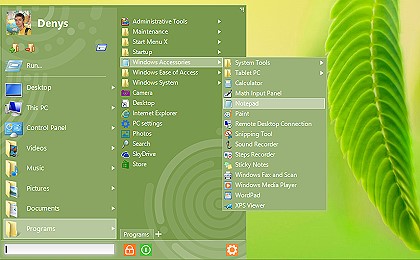
Start Menu X is a replacement of the system menu for professionals. Power users know how inconvenient and time-consuming it is to launch programs from the system menu, so Start Menu X is the right solution!

Benefits of PRO version:

  • Single-click launch!
  • Assign a primary program to any folder and start it simply by clicking this folder.
  • Change the structure and add tabs.
  • Manage the Virtual Groups.
  • Sort files by name.
Download link available today:  http://www.giveawayoftheday.com/start-menu-x-pro-5-30-rerun/

Free alternative: Start Menu 8 from IObit 
Start Menu 8 is specially designed for Windows 8 and Windows 8.1 to bring back both the Windows 8 start button and Windows 8 Start Menu. It offers the option to skip Modern UI, allowing users who only work on desktop to boot to Windows 8 desktop directly. It's the best Windows 8 start menu replacement. Start Menu 8 can also run smoothly on Windows 7/Vista/XP to replace the built-in start menu.
Start Menu 8 from IObit
 

vineri, 30 ianuarie 2015

Giveaway - HippoEDIT text editor for programmers and power users

HippoEDIT
HippoEDIT is a Windows text editor for programmers and power users. One can use it as full featured IDE with support of projects, external tools and auto completion, or as simple source code viewer for web browsers and shell. With HippoEDIT, you can open large log files, view and edit Unicode texts, open files in different encoding and line break styles.
Editor has syntax highlighting and code outlining support for many programming languages, plugins extending the editor with new functionality (FTP Explorer, File Explorer, Spell Checker, Emmet and JS Beautifier, HTML Tools, XML Pretty Print, Live Colors etc.) and color schemes. HippoEDIT has many unique features that you will not find in other editors, which may speed up and simplify your work. Such as Hierarchy and Navigation bar, Colored Braces and Guides, inline color and image previewers, Intelligent Smart Highlight, Code Hints, Fuzzy search, User Text Highlighting, Multi-Clipboard, and Workspaces etc.

Download link available today: http://www.giveawayoftheday.com/hippoedit-1-60/

Free Alternatives:

Inkscape 0.91 released - open source vector graphics software

Inkscape 0.91 released - open source vector graphics software
Inkscape is a graphic design software - vector drawing and editing. It is free (open source) and is an alternative to Adobe Illustrator or Corel Draw.
Inkscape is cross-platform and has versions that run on Windows,  Linux and OS X.
With the new release Inkscape 0.91 rendering and filters have become significantly faster.

Release highlights
  • Cairo rendering for display and PNG export;
  • OpenMP multithreading for all filters;
  • C++ code conversion;
  • Major improvements in the Text tool;
  • Measure tool;
  • Type design feature;
  • Symbol library and support for Visio stencils;
  • Cross platform WMF and EMF import and export;
  • Improved support for Corel DRAW documents, Visio importer;
  • Support for real world document and page size units, e.g. millimeters;
  • Numerous usability improvements;
  • Native Windows 64-bit build;
  • more release details and download links  
Inkscape

Known issue - easy fix :)
• On MS Windows when the desktop colordepth is set to 16-bit, Inkscape is unusable because of exploding memory usage. Please set the colordepth to 32-bit.

10 most exciting features in Inkscape 0.91 


Tileable Patterns in Inkscape

miercuri, 28 ianuarie 2015

Giveaway - Zoner Photo Studio 16 PRO

Zoner Photo Studio
Zoner Photo Studio is the only photo software you’ll ever need. User-friendly Windows software, whose №1 advantage is that it brings every feature you need in a single package. From importing photos onto your PC, to organizing a photo archive, to editing, sharing, and RAW. And almost everything Zoner can do, it can do for batches of photos as well. For example, you can give 1000 vacation photos a frame, resize them to the size you need for a photo album, etc., all at once, saving you time.

Without doubt, it is a serious alternative to Adobe Lightroom. Zoner Photo Studio has a similar interface with a logical workflow.

Key Features:

  • Importing: Right as you’re downloading your pictures to your PC, you can tag them, rotate them to match camera rotation (EXIF), back them up, and more.
  • Managing: Give photographs a rating from 1-5, colored labels, descriptions, and more. Drag-and-drop them onto an integrated Google Map to GPS-tag them, so you’ll know exactly where your photos were taken even years from now. Then find any photo you need in seconds, even among thousands of others.
  • Editing: Dozens of photo editing and retouching features – cropping, resizing, straightening, local edits, exposure and color fixes and more. A Quick Edits panel helps you fix a picture in moments using just a few sliders. The Editor also offers dozens of creative Quick Filters and other creative tools like HDR, Tone Mapping, 3D, panoramas, etc.
Download link available today: http://www.giveawayoftheday.com/zoner-photo-studio-16-pro/

About.com review ****: http://graphicssoft.about.com/od/productreviews/ss/Zoner-Photo-Studio.htm 
Download.com review****: http://download.cnet.com/Zoner-Photo-Studio/3000-2192_4-75186165.html

Zoner free Android photo app: http://www.zoner.com/en/zoner-photo-studio-for-android 
Google play - Zoner Android photo app: https://play.google.com/store/apps/details?id=com.zoner.android.photostudio

Free Alternatives:

sâmbătă, 17 ianuarie 2015

Giveaway - CollageIt Pro 1.9.5

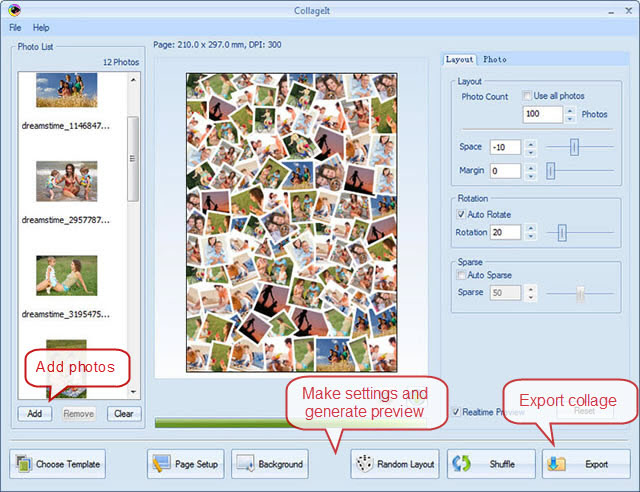
CollageIt - picture collage
CollageIt is an easy-to-use photo collage maker for Windows, which makes collage automatically. In a matter of seconds, this collage software can turn any ordinary photos into impressive collages.

Download link available today: http://www.giveawayoftheday.com/collageit-pro-1-9-5/

Free Alternatives:

vineri, 16 ianuarie 2015

Giveaway - PDFZilla - PDF converter

PDFZilla - PDF converter
PDFZilla is a desktop application that quickly and accurately converts PDF files into editable MS Word Documents, MS Excel Tables, Rich Text Documents, Plain Text Files, Images, HTML Files, and Shockwave Flash SWF Files. PDZilla also allows users to rotate, cut and merge PDF files.
Besides, the program can convert images like PNG, TIF, BMP or JPG to PDF files, which means users can simply create PDF files from images.

Download link available today: http://www.giveawayoftheday.com/pdfzilla-3-0-6-2/

Free Alternatives:

joi, 15 ianuarie 2015

Giveaway - Inpaint 6.0 - Image Retouching software

Inpaint 6.0 - Image Retouching software
Inpaint reconstructs the selected image area from the pixel near the area boundary. Inpaint may be used to delete unwanted objects from your photos. Delete any unwanted object from your photo, such as extra power-line, people, and text.
The programs will automatically Inpaint the selected area to erase it. If some unexpected object spoils an otherwise good photograph, Inpaint may be used to remove it. Simply select the object. No need for fiddly messing about with the clone tool. It is alarmingly simple to use. Draw a selection around the object you wish to remove from the picture, and run smart remove selection.

Download link available today: http://www.giveawayoftheday.com/inpaint-6-0-2/

Free Alternatives: