marți, 29 aprilie 2014

Giveaway - Paragon Backup and Recovery 14 Compact

Paragon Backup & Recovery 14 Compact
Paragon Backup & Recovery 14 Compact is a simple and powerful backup & recovery solution to secure standalone Windows desktops and laptops. It quickly backs up your files and folders, operating system or even your entire hard disk to any storage you choose. The compact edition ensures that your system and valuable data are protected – and can be restored in case of any disaster!
Supports Windows 8, 8.1 and the latest HDD standards!

Key Features:

  • Smart Backup Wizard. Easily secure valuable data without additional configurations.
  • New Backup to Virtual Drive (VD). Back up separate partitions or entire hard disks to the VHD, VMDK and new pVHD formats.
  • New pVHD Backup Format. pVHD (Paragon Virtual Hard Drive) is a special VHD format, optimized for storing backups of virtual and physical machines. It combines the advantages of classic backup archives (e.g. size) with the flexibility of virtual hard drives (access capabilities).
  • New Incremental Backup to VD. Back up changes since the full, or the latest incremental image.
  • New Windows Storage Spaces Support. Copy, back up, restore Windows Storage Spaces directly in our program.
  • Complete UEFI Support. Full 64-bit UEFI support and support for 32-bit EFI with Legacy boot.
  • Support for the latest HDD standards. Enjoy support for AFD (Advanced Format Drive), 2TB+ and non-512B sector size drives.
  • Boot Corrector. Powerful utility that recovers the operating system’s startup ability.
  • Selective Restore. Extract individual files and folders from an archive without restoring an entire image. Use the Restore Wizard and simply check the files that you’d like to restore.
  • New Restore from VD Wizard. Restore entire hard disks, separate partitions, or certain files and folders from pVHD (available under Windows and Linux).
  • Partition alignment for bare metal restore. Partition alignment during restoring to new hard drives ensures that there will be no performance loss due to incorrect partition alignment.
  • Encrypted Backup. To avoid unauthorized access to your backup files, you can easily encrypt them within our backup wizards.
Technical Support: During the Giveaway period Paragon Software provides technical support at www.giveawayoftheday.com. Please, post your questions if you have any troubles while downloading, registering and using the software. Paragon Software’s support team will reply you as soon as possible.
Note: If you have a previous version of Paragon Backup & Recovery you should first uninstall it via Control Panel >> Add or Remove Programs. After that launch the installation wizard, register Paragon Backup & Recovery 14 Compact and enjoy using it!
If you are x64 version user, please follow the link here (file size: 221 MB)
Download link available for today:  http://www.giveawayoftheday.com/backup-and-recovery-14-compact/

vineri, 4 aprilie 2014

Giveaway - WinX DVD Ripper Platinum 7.5.4

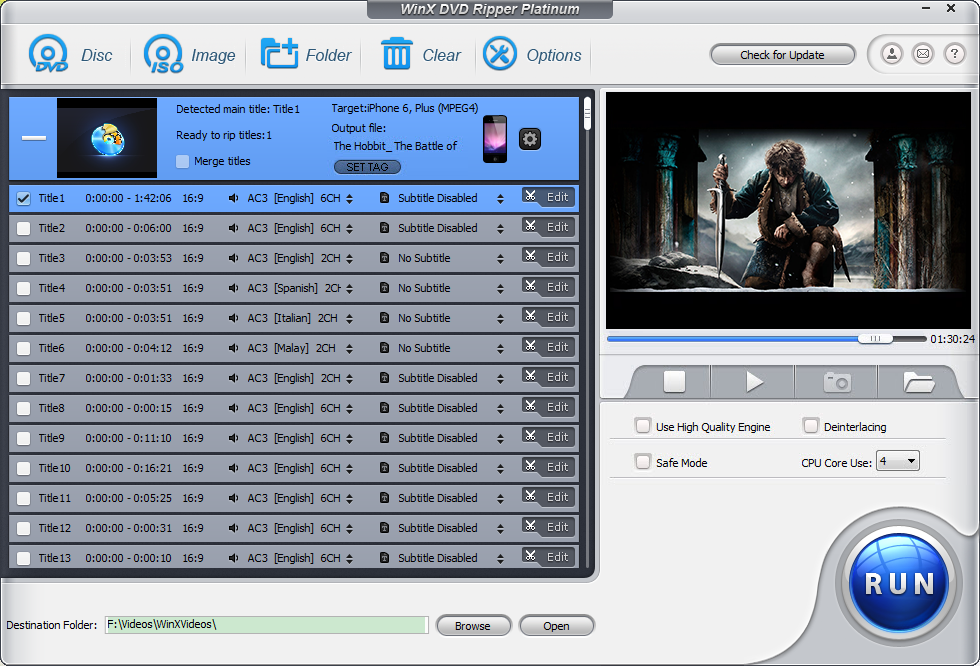
WinX DVD Ripper Platinum
The latest version of WinX DVD Ripper Platinum has skyrocketed to 50% faster in conversion speed while keeping highest possible quality.

Recent major updates:

  • Greatly improved the reading and pre-reading speed of optical drive, encoding technology, and multi-core optimization.
  • Added new profiles for Galaxy S5 and Surface Pro.
  • Support forced/hard subtitle.

Key features:

  • Built in 320 profiles, it supports ripping DVDs to any popular video formats and mobile devices.
  • Rip DVDs to M2TS, AVI, MP4, H.264, FLV, MOV, iPhone, iPad, Android, HTC, Samsung, WP8, etc.
  • Support trimming, cropping, merging videos, selecting inner subtitle, and adding extra subtitle before ripping.
  • Copy DVD full title / main content to MPEG file and clone DVD to ISO image, DVD folder.
  • Rip protected DVD in about 6 min (tested on a PC with Intel Core i7-4770k 3.50GHZ, 32GB RAM, Windows 7, DVD name Rio, output format MP4). The actual transfer time also depends on your CPU and DVD driver speed.
Download link available for 3 days: http://www.giveawayoftheday.com/winx-dvdripper-platinum/

vineri, 21 martie 2014

3D with Blender 2.70

Blender 2.70
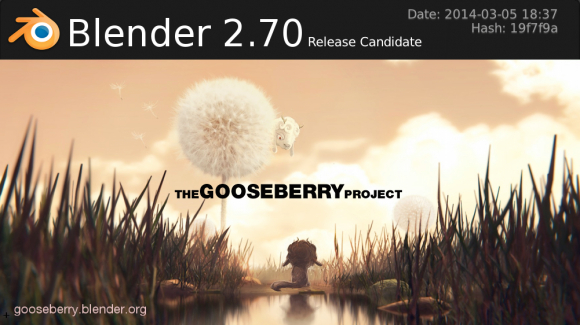
After two release candidates, the Blender Foundation has now released Blender 2.70
New features include initial support for volumetrics in Cycles, and faster rendering of hair and textures. The motion tracker now supports weighted tracks and has improved planar tracking. For mesh modeling there are new Laplacian deform and wireframe modifiers, along with more control in the bevel tool. The game engine now supports object levels of detail.
The first results from the new user interface project are also in this release, with dozens of changes to make the interface more consistent and powerful. This is also the first release of the multithreaded dependency graph, which makes modifier and constraint evaluation faster in scenes with multiple objects.

Cycles Rendering

Cycles 270 Volume.png
Cycles now has initial support for volume rendering including emission, absorption and scattering. Volume rendering can be used to render effects like fire, smoke, mist, absorption in glass, and many other effects that can't be represented by surface meshes alone.
CPU rendering performance was improved, particularly for hair, textures and Open Shading Language.

Motion Tracker

Blender2.70-PlaneTrackImage.png
Trackers can now be weighted, to keep the result stable as feature disappear or become difficult to track. The plane track workflow was improved to be easier to control. Automatic feature detection was made more robust using a new detector algorithm.


  User Interface

Header menu collapsed.png
The toolbar now has tabs to organize tools in categories. Multiple buttons can now be edited at once, for example for XYZ axes or color channels. Transform tools now have a mode to enter expressions and units. Other changes were done to improve lists, header menus, tooltips, buttons, menus and more.


Modeling

Wireframe Mod Result.png
The Laplacian Deform modifier was added to pose a mesh while preserving geometric details of the surface, and a new wireframe modifier allows you transform your mesh into a wireframe representation. The boolean modifier now supports ngons, and there are improvements to the bevel, screw and triangulate modifiers.
The bevel tool now offers more control over the bevel profile and results, and the knife tool was improved as well.

Threaded Dependency Graph

GSoC-DepsGraph-ThreadedCPULoad.png
An important change that happened under the hood is the threaded dependency graph. This means that object modifiers and constraints, among other things, can now be computed with multiple threads taking advantage of multicore processors. This will be most noticeable with scenes that have many objects, or multiple objects with heavy modifiers. This is the first step in making the dependency graph in Blender more powerful.


Game Development

FPS-Walk-Navigation-Shortcuts.png
The Blender game engine now supports discrete level of detail for meshes. For game developers, support for working with Photoshop PSD files has been added.
A new view navigation walk mode has been added, which has a control scheme as typically found in first person shooter games. This can be useful for game developers to navigate levels as if in a game.


Freestyle NPR Rendering

Blender261 python changes.png
The Freestyle Python API is an essential part that makes it a highly programmable NPR rendering engine. This API has been reorganized.


More Features

Blender2.70 MaskOverlapFill.png
Many small changes and features were done all over Blender. Some notable new feature are normalized display for FCurves, derivative map baking, baking to vertex colors, better visualization of masks and control over mask filling, gravity option for sculpting, negative texture values to support vector displacement and a Lamp Data shading node to create more customized NPR shaders.


Download link: http://www.blender.org/download/

luni, 17 martie 2014

MakeHuman 1.0.0 - 3D prototyping of photo realistic humanoid

MakeHuman
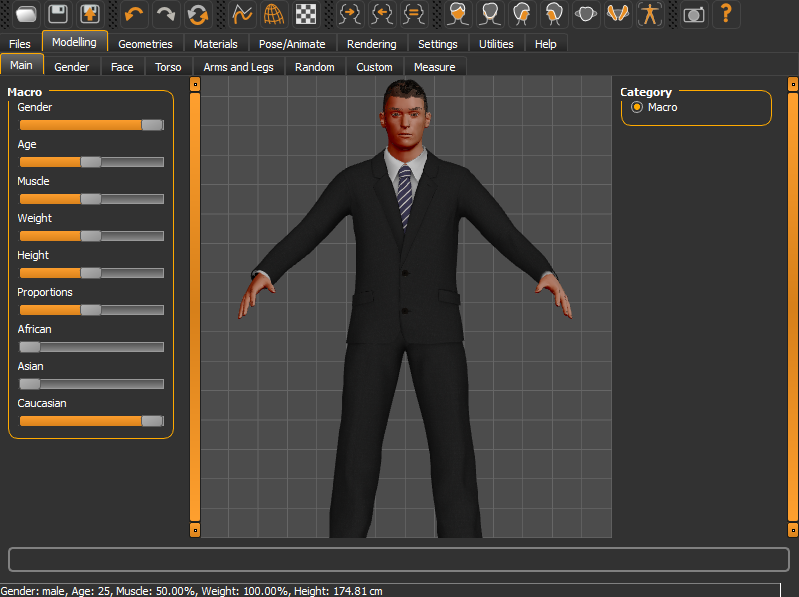
Makehuman is an open source 3D computer graphics application designed for the prototyping of photo realistic humanoid to be used in 3D computer graphics. It is developed by a community of programmers, artists, academics interested in 3D modeling of characters.

The MakeHuman team is pleased to announce the release of MakeHuman 1.0.0, a free, open source tool for creating 3D virtual avatars, game characters or biologically realistic humans. Users can build 3D characters by simply dragging sliders to modify features (E.g. age, gender, weight, height, muscles, etc.). MakeHuman also provides libraries which allow you to automatically fit hairstyles and clothes to the character. The software aims to be user friendly, intuitive and at the same time provide a professional output.
All the content created with MakeHuman is licensed under one of the most liberal licenses in the world, offering artists unprecedented freedom to use their MakeHuman creations in any way they can imagine (“No Rights Reserved” CC0 license).
Makehuman provides its own exchange format the mhx (MakeHuman eXchange) which allows for importing of a fully rigged model into blender with IK/FK and control bones allowing for easy animation.

Download link: http://www.makehuman.org/content/download_makehuman_100.html

sâmbătă, 15 martie 2014

Cyberlink PhotoDirector 4 - giveaway

Cyberlink PhotoDirector 4

Download.com giveaway - Cyberlink PhotoDirector 4

Cyberlink PhotoDirector 4 comes packed with a complete set of photo editing tools, so you can manually adjust the color, saturation, white balance, and more, but you'll also find that there are Preset options, so you can easily choose a theme, set it and share it - just like many of the mobile photo editing apps. If you are into landscape photography, the HDR effect is a nice feature that helps you create dramatic-looking HDR scenario from a single photo.
 
In order to get the freebie, you will need to follow these steps closely:
  1. Go to this page
  2. Enter in your name, email address, and this code - PHD4CNET. This is very important - you must enter this code in.
  3. Once you enter in the code, your license keys for both Mac and Windows version will be provided to you. Not only do you get a key for your Windows machine, you can install one for your Mac too, or give it to a friend.
  4. Once you go through the installation process, you will need to enter in the license key. Otherwise, you will not be able to access this software, so make a note of these license keys. You should also receive an email with the info, but just to be safe, I would screenshot it or save it.
There you have it. You now have a great piece of photo editing software that is easy and fun to use for free. The free giveaway promotion starts now and ends at 11:59pm PT on Sunday, March 16, 2014, or whenever we run out.

joi, 13 martie 2014

Partition with Aomei - giveaway

Aomei makes hard disk partitioning even easier by offering Partition Assistant Pro for free, exclusively for Download.com users.
Anyone with the right set of tools can partition a hard drive. Aomei Technology aims to make the process even easier by bringing you these tools absolutely free with its Partition Assistant Pro giveaway. From March 12, 2014, to March 19, 2014, you can get the popular professional disk-management utility at no cost, exclusively on Download.com.

Why partition your hard drive?

Partitioning tells your computer to treat different portions of your hard disk as separate drives. This makes creating backups faster and easier, as most data backup tools target entire disks. Keep essential files (like the OS) on one partition and back them up regularly while saving dispensable files on another. Create a separate boot partition and load it with diagnostic tools in case your main operating system fails. This can save you the scramble of finding a USB or CD to troubleshoot issues. Older brand-name computers come with recovery images saved in hidden partitions that may be outdated. Update them with your own image to get going faster in case of a meltdown. Lastly, if you're thinking of experimenting with other OSs (like Linux or SteamOS), you can section off portions of your drive without having to back up and format.

Aomei Partition Assistant Pro

One of the most highly rated tools among our editors and users, Aomei Partition Assistant Standard Edition is our go-to free disk-managing utility to resize/move, migrate OS, create, delete, format, align partition, and convert between file systems (NTFS to FAT32). Partition Assistant Pro gives you all the same tools as Partition Assistant Standard, plus additional functions such as converting between MBR and GPT, converting dynamic disk to basic, and dynamic disk/volume management.


Main Features
  • Windows to Go Creator installs Windows 8 to a removable Flash drive
  • Convert System disk between MBR and GPT styles
  • Migrate System to SSD, and support MBR and GPT disk
  • Create Windows PE bootable media without having to install AIK/WAIK
  • Completely support hard disk with 4096 bytes sector size
  • Fully compatible with Windows 8.1

How to get it

You can get Partition Assistant Pro for free (regularly $36) just by visiting this link between March 12, 2014, and March 19, 2014.
Alternatively, you can download the installer and activate with the license code AOPR-L79S3-VJVU6-9WX1H

marți, 11 martie 2014

Fotor Photo Editor

Fotor Photo Editor
Fotor Photo Editor comes loaded with tools for every essential editing need, plus tilt-shift, 13 unique 1-tap enhance options, over 60 effects/30 frames, RAW support, built-in sharing, and high-resolution saving.

Collage away! Pick from 60 different templates or customize one, and choose from 16 backgrounds. Upload up to 30 photos to mix and match. Finish off your masterpiece with the border color or pattern that catches your eye.

Fotor's state-of-the-art photo processing engine makes it easy to process high quality photos quickly. Adjust exposure, brightness, contrast, white balance, and saturation, sharpen/blur, vignette, highlights & shadows. "Scenes" offers 13 enhance options preconfigured for various photo capture conditions.

Effects & Borders stretches your creativity further with Fotor's huge palette of effects and borders.

Batch Processing lets you make short work of large numbers of photos. Apply effects and frames with just one click, instead of having to do it to each photo!
What's new in this version:
  • Powerful Batch Processing - Save your time to quickly edit multiple photos
  • New Useful Functions - Highlights, shadow and curves adjustments
  • More Better Choices - More filters, special effects, borders, patterns and freestyle collage backgrounds
  • Improved Features - Added EXIF information when sharing photo to Flickr
  • Better User Interface - Fotor Photo Editor is more fun and much easier to use
Download link: http://download.cnet.com/Fotor/3000-2192_4-75901678.html
More details: http://www.fotor.com/