joi, 26 februarie 2015

Krita 2.9 - open source Digital Painting

Krita 2.9 - open source Digital Painting
Open-source paint tool Krita 2.9 introduces new workflows for HDR painting.
The development team calls version 2.9 Krita’s “biggest release until now” with dozens of new key features.
Although Krita has been around for a while, it has rapidly grown better suited for serious professional work over the past two years – development further accelerated by last year’s successful Kickstarter campaign.

Highlights of this release:
  • new Perspective transform tool with vanishing points highlight;
  • new Cage and Liquify transform tools;
  • non-destructive transformation via transform masks;
  • various improvements in deep painting;
  • better blending in the Mix brush and assorted improvements in brush engines;
  • new assistants to help drawing parallel and infinite lines, as well as objects in perspective;
  • updated port of G'MIC to provide all the new features including artwork colorization;
  • better support for PSD and EXR files, newly added loading of raw files, newly added support for r16 and r8 heightmaps.
New transform modes, HDR colour picking
Features funded by the Kickstarter cash include a range of new transformation modes, including Liquify, Perspective and Warp, all with support for masks for a non-destructive transform workflow.
In addition, the colour picker now supports HDR colour selection, in the shape of the HSI and HSY colour spaces. (The I and Y components effectively turn exposure up or down.)


There are also a number of changes to brushes, including anti-aliased brush tips, better blending in the Mix brush, and the options to save changes to brush presets on a per-session basis.
Krita 2.8 interface
More Photoshop-like workflows for masking images and browsing reference material
Masking now works in a way more similar to Photoshop, with a new global selection mask, and the option to separate alpha channels into transparency masks.
And like Photoshop, reference images can now be viewed alongside your painting in multiple sub-windows, which are cascaded or tiled automatically. Alternatively, there is a full-screen tabbed window mode.
Lots more new features and pipeline integration improvements
Other highlights include a new option to split all of the flat colours on a layer into their own separate layers; and new assistants for parallel, infinite and vanishing point lines in perspective drawings.
Compatibility with professional pipelines advances steadily, with all but four blending modes in PSD files now supported, improved OpenEXR support, and the option to import RAW files.
There are also a lot of smaller additions and bugfixes, which you can find in the official release announcement.


Availability
Krita 2.9 is available now for most popular flavours of Linux or Windows Vista and above. There is a experimental and unstabl” Mac build  (OS X 10.9).
Read a full list of new features in Krita 2.9
Download Krita 2.9

marți, 24 februarie 2015

Giveaway - Solveig MM Video Splitter 4 Home

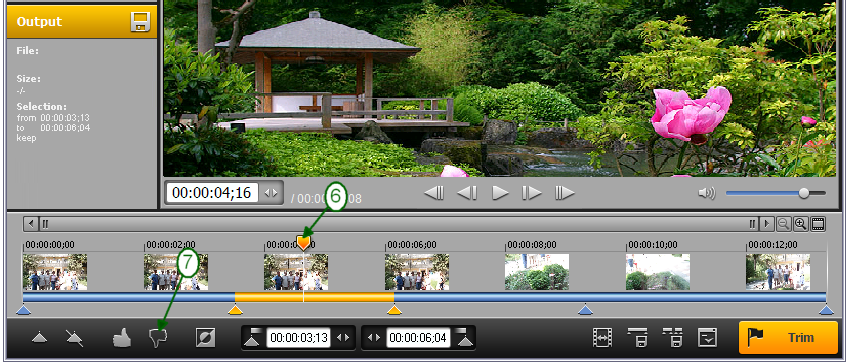
SolveigMM Video SplitterSolveigMM Video Splitter video editor for Windows operates with FLV, AVC/H264, MP4, MOV, AVCHD, MPEG-2, MKV, WEBM, MPEG-1, AVI, WMV, MP3, WMA files. The software provides seamless editing experience, removing unwanted video parts with just a few clicks, perfectly cutting and joining video and audio streams. The editor builds on the frame-accurate approach keeping 99.9% of data intact.
It is capable of cutting out any number of video or audio fragments at once, without re-encoding the data, preserving the original quality of the movie and is indispensable for such tasks as editing out commercials from a captured TV program, parental advisory, splitting movies and clips for CD writing and extracting audio track from video file. SolveigMM Video Splitter gives the power to edit your videos both easily and professionally.

Download link available today:  http://www.giveawayoftheday.com/solveig-mm-video-splitter-4-home/

Free alternatives:

marți, 10 februarie 2015

The story of Paris-8 University going for Krita, Blender, Natron - Open Source CG software

Krita - digital painting
In the last years Blender and now Krita had evolved on a steady pace which proved to be an attractor for newcomers in CG industry.
Alexandre Prokoudine has posted an interesting article about the switch to open source software at Paris 8 University:
http://libregraphicsworld.org/blog/entry/the-complete-story-of-paris-8-university-going-for-krita-blender-natron
Blender - 3D shader editing
Let's hope it will be a serious push in development and will enhance the communication between coders and artists.
It's important to have an efficient workflow and the right tools with fast results.
Natron - compositing

An experimental short film named "The Desert of Sonora" ("Le Désert Du Sonora"). 


Giveaway - Leawo DVD Creator 7.1

Leawo DVD Creator 7.1
Leawo DVD Creator is a professional home DVD creating program. It provides an easy-to-use and friendly DVD making solution to help you convert and burn video to DVD content for any use. It is a powerful video to DVD converter that supports various video to DVD conversions, like AVI to DVD, MKV to DVD, MP4 to DVD, WMV to DVD, Xvid to DVD, etc. With ingenious video editing features available, this DVD maker creates individualized DVD movies easily.

Key features:

  • Convert and burn video in AVI, MKV, MP4, MPG, MPEG, FLV, 3GP, WMV, ASF, RM, RMVB, etc. to DVD-9/DVD-5 disc, folder or ISO files;
  • 40+ preset disc menu and template models are available for disc settings, disc menu and template DIY are feasible via the internal disc menu designer;
  • Create 3D DVD movies from 2D videos in 6 different 3D effects: Red/Cyan, Red/Green, Red/Blue, Blue/Yellow, Interleaved, Side by Side;
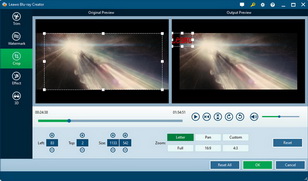
  • Customize videos via video editing features: trim video length, crop video size, adjust video effect, add image or text watermark, etc.
  • Select subtitles and audio tracks from source videos, or even add external subtitles for output DVD movies;
  • Save ISO Image Files while burning video to DVD discs or folders;
  • Directly burn ISO Image Files to DVD discs with fast speed;
  • Set aspect ratio, TV standard, volume label easily;
  • View the memory storage of output DVD movies easily;
  • CPU core could be adjusted for smooth going of other programs;
  • Fast converting and burning via advanced Intel Quick Sync accelerating technology;
  • Batch converting saves time and energy.
Download link available today:  http://www.giveawayoftheday.com/leawo-dvd-creator-7-1-0/

Free alternatives:

joi, 5 februarie 2015

Free Studio audio video converter and downloader

Free Studio Manager
Free Studio Manager is a completely redesigned all-in-one package for more than 45 programs. It contains eight sections to bundle all free multimedia applications which have been developed by DVDVideoSoft. These sections the following: YouTube, MP3 and Audio, CD-DVD-BD, DVD and Video, Photo and Images, Mobiles, Apple Devices, 3D. Thus all the programs are included in the new interface for easy access to any of them.
With this free software you can convert video and audio files between different formats and to iPod, PSP, iPhone, BlackBerry, and all popular mobile phones and devices burn and rip DVDs and audio CDs upload and download YouTube videos and music to your computer, iPod, PSP, iPhone, and BlackBerry perform basic editing of audio and video files as well as record videos and make snapshots.


Download link and review: http://download.cnet.com/Free-Studio/3000-2170_4-205258.html
Official site: http://www.dvdvideosoft.com/free-dvd-video-software.htm#.VNRxpSwvz-k  

miercuri, 4 februarie 2015

Google Earth Pro goes free to use

Google Earth
Google has made Google Earth Pro free to use.

What do you get in the Pro version?
Many people are familiar with the existing free edition of Google Earth, which enables users to view satellite images, supplemented with 3D buildings.
The Pro version it enables you to supplement the standard data set by importing GIS data, and includes basic measurement tools (shown in the video below).
It also allows users to print higher-resolution images and to generate custom flythrough movies.


Availability
Google Earth Pro is available for Windows XP and above, Mac OS X 10.6 and above, and Linux.
See a comparative table of features in the old free edition and Google Earth Pro
Download Google Earth Pro (Includes the registration form for the free licence key)

Download 3D fractal art software Substance for free

3D fractal art software Substance
Stephane Marty has made Substance (organic and 3D fractal software) and Emulsion (photorealistic rendering) available to download free.

Create organic 3D forms quickly and intuitively

Substance is an intuitive tool for generating 3D fractals and organic forms.
You can use a ‘fractal microscope’ to navigate 2D fractals and isolate sections and convert them into 3D forms.


The resulting geometry can be exported in OBJ format, using a built-in mesh-decimation algorithm; or rendered using Substance’s P.U.R.E. unbiased rendering engine. There’s even support for augmented reality.
3D fractal art software Substance

The second application, Emulsion, is a progressive real-time physically based renderer. It works in CPU-based, GPU-based and hybrid modes, and supports multi-core and Hyper-Threaded systems.
The software includes a basic materials editor and camera settings, and supports tone mapping.
It imports 3DS, OBJ, DAE, DXF, PLY, STL and RAW files and exports HDR and EXR files – and again, has a built-in augmented reality option.


System requirements and availability
Both Substance and Emulsion are compatible with Windows XP and above, although for Emulsion, you’ll need to be running a 64-bit OS. Emulsion’s GPU rendering mode supports both Nvidia and AMD cards.
Both applications are free downloads and are provided without support or documentation: note that the inline help no longer works, since NeuroSystems’ servers have now been shut down.
Download Substance from Stephane Marty’s website
Download Emulsion from Stephane Marty’s website